
To search by Issue Date select a Category/Subcategory or left the selection on the default ALL setting. Choosing a Category/Subcategory narrows your search to documents most relevant to your present interest.
The Issue Date fields create parameters for when documents were posted. The example below demonstrates this method.
| Select the search button from the top menu. |
 |
| Select (or enter) the Issue Date FROM. |
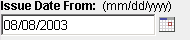 |
| Select (or enter) the Issue Date TO. |
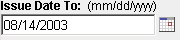 |
| Click SEARCH. |
 |
All documents applicable to the specified Issue Date range display Sprinterting with the most recent.
Back to search selection.